Zenbundle Is One of 10 Shoppable Video Partners for the Shop App
Any merchant can post to the Shop home feed by hand. Ten apps can do it automatically, and Zenbundle is the only retail media platform among them.
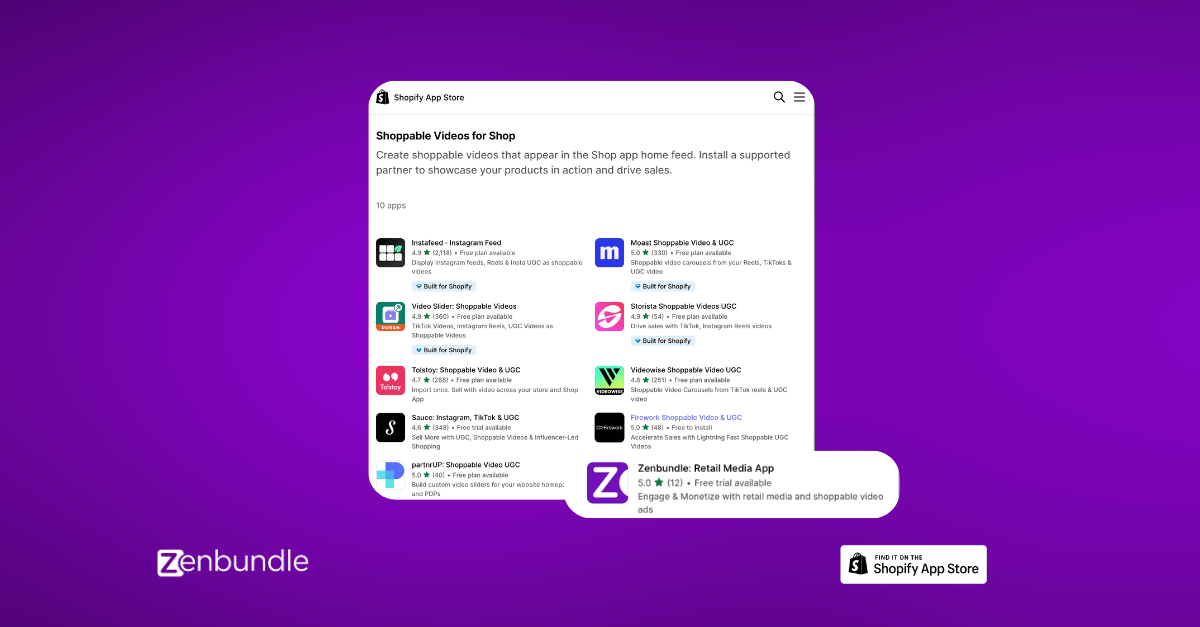
Shopify runs a curated collection in the App Store called Shoppable Videos for Shop. Its description is short and specific: "Create shoppable videos that appear in the Shop app home feed. Install a supported partner to showcase your products in action and drive sales." There are ten apps on it. Zenbundle is one of them.
What the Shop app feed actually is
The Shop app is Shopify's own consumer shopping app. Posts are what Shopify calls "shoppable content that let you highlight products or collections in Shop using images and videos, a headline, and a caption".
By Shopify's own documentation they surface in three places: the Shop home feed, where posts are ranked by product relevance for customers browsing Shop; the store's Shop Store page, shown to visitors in the app and on the web; and the Following tab, for shoppers who already follow the store.
Read that first one again. Ranked by relevance, not bought at auction. There is no bid to place and nobody can outspend you into the feed. This is not a widget on your own product page, where the shopper has already arrived. It is distribution to people who were not looking for you, on someone else's surface, at no media cost.
Zenbundle has been syncing video into it since January 2026, in beta, as a partner selected by Shopify ahead of the April public launch. Posts from Zenbundle appear in the Shop channel's Posts table inside the Shopify admin, tagged Source: Zenbundle.
Here is what that actually looks like
Twenty seven seconds. A Zenbundle post in the Shop home feed, then the tap through to that exact product inside Shop, in stock, in size, ready to buy. Watch the little product card sitting on the video. That card is the whole argument, and it is what the next section is about.
Three ways in, and the one thing that separates them
Let us be straight about this, because it is where most of the confusion sits. You do not need Zenbundle to post to the Shop feed. There are three routes, they are all open to any merchant, and they are not equal.
1. Post it by hand
Sales channels, then Shop, then Posts. Write a headline of up to 50 characters, a caption of up to 2,200, add your media, tag up to ten products or one collection, publish. Free, available to everyone, and completely fine. The cost is somebody's afternoon, and then somebody's afternoon again next week, for every product you want to feature.
2. Connect your Instagram
Shopify imports your Reels, image posts and carousels from the last 90 days and syncs new ones automatically. Genuinely useful, and if you are already posting well on Instagram you should turn this on. But it brings your content across as content. The post arrives with your caption and your video and no product attached to it unless someone goes in and tags one by hand.
3. Sync from a supported app
Ten apps can do this, Zenbundle among them. In our case the post arrives with the product already tagged, because the video was matched to that exact product when it went onto the product page. The sync and the tag are the same job.
Here is why the tag is the whole argument. Shopify's own post composer says it plainly: "Posts without tagged products or collections will show personalized recommendations from your store."
Read that as a shopper. They watch a video of a specific boot, they tap, and instead of that boot they get a general set of suggestions from the store. The reach still happened. The intent got thrown away at the last step. An untagged post is an advert for your shop. A tagged post is an advert for the thing in the video, and only one of those can be a direct route to a sale.
Scroll back to the video above and watch the tap again. The card that comes up carries the product, the price and the size, because the post was tagged. Take the tag away and that same tap is a shrug.
Nobody makes a video for it
This is the part worth slowing down on, because it is where the economics sit.
The video in the Shop feed is not a Shop-app asset. It is the retailer's existing shoppable video campaign from their product page, the one Zenbundle already sourced, matched to the product, stock-gated and put live on the PDP. Shopify pulls that same video into the Shop feed. No new brief, no new edit, no separate upload, no second version to keep in sync.
And it runs in one direction that matters. A shopper taps the video in the Shop app, lands on the product page, and the same video is playing there. Same creative, same product, no jolt between the two.
What the retailer actually does
To get the video
Nothing. Zenbundle sources it from the brand and social content that already exists
To get it on the PDP
Nothing. It is matched to the product, gated on live stock, and made shoppable
To get it into Shop
Nothing. The same campaign syncs to the feed with the product already tagged. No media budget, no auction, no CPM
Across the Zenbundle retailers syncing today that comes to 448 posts live in Shop from 17 stores, spanning running, footwear, pharmacy, electrical, books and outdoor. Not one of them was made for Shop. Every single one is a product-page campaign that was already running.
One Zenbundle store, 15 June to 7 September 2026
300,000+
impressions in the Shop app feed, from 34 videos that were already on the product pages
34
posts, none made for Shop
2,720
interactions
0
extra spend to earn it
What the two numbers are. Impressions are how many times a post was surfaced to a shopper in Shop, so reach rather than plays or completed views. Interactions are taps on it. Shopify reports both per post but does not publish formal definitions for either, so read those as our plain description of the two columns rather than Shopify's wording.
Read from that store's Shop Posts table in the Shopify admin, filtered to Source: Zenbundle. Shopify rounds larger impression counts in that view, so the total is stated as an approximation rather than to the unit. The store is not named because the numbers are theirs, not ours.
And the part that shows up in the till
Reach is only interesting if it walks through the door. Over the same window, Shopify's own channel reporting for that store attributes 448 sessions and 27 orders to the Shop app, worth just over 3,500 dollars in gross sales, from a surface with no media cost attached to it.
Provenance, because it matters: those figures come from Shopify's sessions and sales datasets, referring channel shop_app, for 15 June to 7 September 2026. That channel covers all Shop app traffic to the store, not only these video posts, so treat it as the ceiling on what the posts contributed rather than a clean attribution to them. We would rather publish the honest version of the number than the flattering one.
Reach you did not already have
The word that matters here is incremental. Every one of those impressions happened somewhere you are not. Nobody landed on your site, opened your email, or clicked an ad you paid for in order to see it.
Line it up against the channels a retailer already runs. Email reaches the list you spent years building. Paid reaches exactly as far as the budget goes and stops the day you stop. Your product page reaches the shopper who already found you. The Shop feed reaches the ones none of those touch, and it does it organically: ranked in on relevance, served to browsers and to the shoppers already following your store.
That last group compounds quietly. Every post also goes to your followers in Shop, so the audience you pick up does not have to be re-bought next month. It is the closest thing an independent retailer gets to owned reach on somebody else's platform.
For scale across the whole group: those 448 posts have drawn close to 400,000 impressions in total.
It is not spread evenly and we are not going to pretend otherwise. The stores with the longest run and the deepest video libraries carry most of it, and nine of the seventeen only published their first post in mid-August, so their numbers are three weeks old rather than three months. Treat the total as the size of the channel so far, not as what any one store should expect.
Ten apps, and where we sit on the list
Nine of the ten are social and UGC video apps. They pull in Instagram Reels, TikToks and creator clips and turn them into a slider on your storefront. Good tools, and Shop app sync is a real addition to them.
Zenbundle is the only one on the list built as a retail media platform. The video is not the product. It is one of the places the product data ends up. The same campaign that runs on the product page also goes into the Shop app feed, and into the Google Merchant Center feed, where Google is putting video live in Shopping listings in Q4 2026.
One campaign, three surfaces
The product page
Where it converts the shopper who already found you
The Shop app feed
Where it reaches the shopper who has not, at no media cost
Google Shopping
Pushed into the Merchant Center feed, ready for video in Shopping listings
Why this matters if you are an independent retailer
Independent stores lose to the big players on reach, not on product. You can carry the same brands, price them well, and still never get seen, because the discovery surfaces belong to somebody else and they are sold by auction.
The Shop app feed is one of the few places where that is not the case. There is no bid to win, and access is not the barrier either, because any merchant can post there by hand today. The barrier is doing it at all, week after week, and doing it so the tap lands on a product rather than a suggestion.
Most retailers already have the video. It is on the brand's asset portal, or on their own Instagram, doing nothing for the product page. Zenbundle's job is to find it, match it to the right product, make it shoppable, and then put it everywhere it can go.
Get your video into the Shop app feed
Book a setup call and we will show you what video already exists for the brands you carry, what it would look like on your product pages, and what goes into the Shop feed from there.
15 min
setup call
24 hrs
to go live
1 of 10
apps that can sync it for you
Official Shopify App, 5.0 stars, live in 24 hours.
The bottom line
Shoppable video on your product page earns its keep on the shoppers who already found you. The Shop app feed adds the other half, the ones who have not, and it does it with the same video, for nothing.
Anyone can post to that feed. Ten apps can do it for you. One of them tags the product, so the tap lands on the thing in the video.
Source: Shopify App Store, "Shoppable Videos for Shop" collection, apps.shopify.com/collections/shoppable-videos, checked 7 September 2026. The collection is curated by Shopify and its contents can change. Definitions of Posts, where they surface, the manual and Instagram routes, and the tagging limits: Shopify Help Center, Shop sales channel, Posts. The line about untagged posts showing personalized recommendations is Shopify's own wording in the post composer in the Shopify admin. Fleet figures read from each store's Shop Posts table in the Shopify admin on 7 September 2026, filtered to Source: Zenbundle.

.png)
